New Home Build System

Your first-time guide to what's actually supposed to happen.

Know what to check before it's covered up. The New Home Build System gives you the stage-by-stage structure, budget tracking, and builder communication to manage a new home build from vacant block to handover with confidence.

$99 one-off. No subscription.
Why building new is harder to manage than it looks

Nobody hands you a manual for building a house.

Most first-time builders have never seen a slab poured or a frame stage inspected — so there's no reference point for what's normal. This system exists to give you one.

"What does a good slab, frame, or lock-up actually look like?"

You can't compare your build to anything if you've never watched one happen. Without a reference point, it's hard to know if what you're seeing is normal.

"How do I keep track of an 8–14 month process?"

A new build runs through dozens of decision points and stages, over the better part of a year, with no obvious place to hold it all.

"What do I need to check before it's covered up?"

Once the next stage starts, what's underneath is gone from view. Knowing what to check — and when — is the difference between catching an issue and missing it.
What's inside

10 sections. 57 templates. 68 pages.

Everything from choosing your builder to the day you collect the keys, built specifically around a new build on a vacant block or knock-down-rebuild.

1

Your Command Centre

4 templates

2

Project Management Systems

4 templates

3

Builder Communication System

7 templates

4

AI Prompt Library

6 templates — structured prompts to get better answers from AI tools like ChatGPT, not a live AI product built into the system.

5

Financial Management System

10 templates

6

Before Construction

5 templates

7

Pre-Start

5 templates

8

Construction

8 templates

9

Handover

6 templates

10

Progress Tracker

2 templates

See every feature

How it compares

There's nothing else quite like this yet.

A display home shows you the finish. Nobody shows you the process. This does.

A display home tour and a Google search

What most first-time builders start with

Free — and unstructured
  • Shows you the finished product, not the eight-to-fourteen-month process to get there
  • No reference point for what a good slab, frame, or lock-up is supposed to look like
  • Scattered forum threads and one-off blog posts, not a system built for your project
  • Nothing to check against once the next stage covers up what came before

Build Companion New Home Build System

$99 one-off
  • A stage-by-stage manual for what's supposed to happen, and what to check before it's covered up
  • Built specifically for a first-time build on a vacant block or knock-down-rebuild
  • A Financial Management System sized for the full build, from land to landscaping
  • Pay once, keep it for the entire build and the years of warranty after it
Who this is for

Built for first-time custom home builders — not project managers running it professionally.

This is built for you if

  • You're a first-time custom home builder on a vacant block or knock-down-rebuild
  • Your project budget is roughly $130,000–$300,000 or more
  • You're working with a builder — and possibly a separate designer or architect — for the first time
  • You want to know what to check at each stage, before the next one covers it up

This probably isn't for you if

  • You're buying an established display-home-style house-and-land package with full project management from the builder and zero customisation
  • You're an owner-builder
  • You're a tradesperson running the job yourself
Inside the system

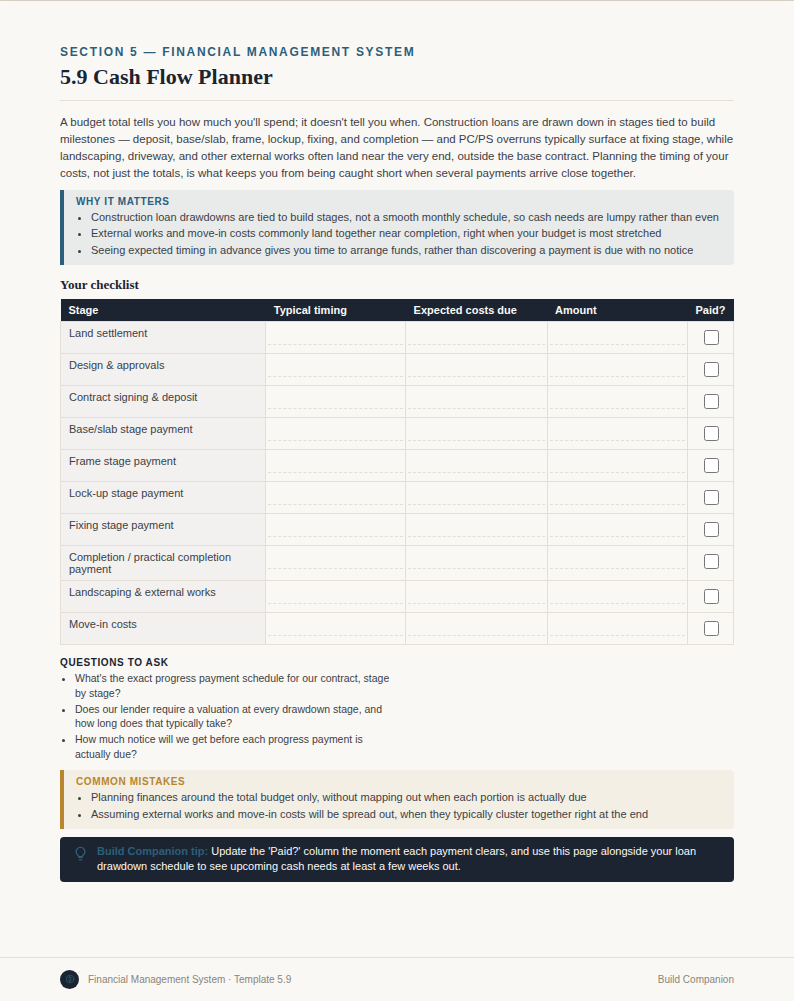
A cash flow planner built for the way new builds are actually paid for.

Progress payments land at specific stages, not evenly across the build. The New Home Build System's Cash Flow Planner maps what's due against each stage so you're never caught short — one part of a full Financial Management System covering the whole build, from land to landscaping.

Explore what's inside
Build Companion New Home Build System cash flow planner page
Pricing

One price. One build. Yours to keep.

Frequently asked

New Home Build System — questions homeowners ask.

Do I need this if I'm using a project home builder vs a custom builder?+
If you're building from a project home builder's standard range with some customisation, yes — you're still making dozens of decisions, still paying progress payments against stages, and still need to know what to check at handover. If you're buying a completed house-and-land package with no customisation and full project management included, this system will be less useful to you.
We haven't chosen a builder yet — can I still use this?+
Yes. The Before Construction and Builder Selection sections are built for exactly this stage — questions to ask a builder before signing a contract, how to compare quotes, and what to check before you commit.
Does this work the same way for a knock-down-rebuild as a vacant block build?+
Yes. The core process — pre-start, construction stages, handover — is the same for both. A knock-down-rebuild adds demolition and site-specific steps early on, which the Before Construction section also covers.
What's the difference between the Construction section and the Progress Tracker?+
Construction covers what to check and ask at each stage — slab, frame, lock-up, fixing, and beyond. Progress Tracker is a running log where you record what's actually happened on your build against that plan, week to week.
Is this actually a PDF?+
It's delivered as a print-ready and genuinely fillable digital document — you can type directly into every field on-screen, or print and write by hand. What matters isn't the file format, it's the system inside it: dashboards, registers, and trackers built to be used every week of your build, not read once.

Know what a good slab, frame, and lock-up look like before you need to.

The New Home Build System. $99 one-off. Instant access.